BSTweaker –BlueStacks & MSI Tweaker
BSTweaker is a lightweight and powerful tool for Windows that lets you tweak and optimize BlueStacks and MSI App Player settings, manage root access, and improve emulator performance.
About BSTweaker
BSTweaker is a lightweight and user-friendly tool for Windows that lets you tweak and optimize BlueStacks and MSI App Player settings. It provides easy access to root management, device profiles, and performance tweaks.
Built for gamers, developers, and testers, BSTweaker integrates smoothly with the emulator without replacing it. It is fast, responsive, and unobtrusive, allowing you to adjust settings, enable root access, or optimize CPU and memory allocation without disrupting your gameplay or workflow.
Designed to be simple yet powerful, BSTweaker runs locally on your Windows PC, consumes minimal system resources, and ensures safe modifications without affecting your existing emulator installation.
Whether you want to modify device profiles, enable advanced settings, or improve emulator performance, BSTweaker makes BlueStacks and MSI App Player customization effortless and reliable.
Features of BSTweaker
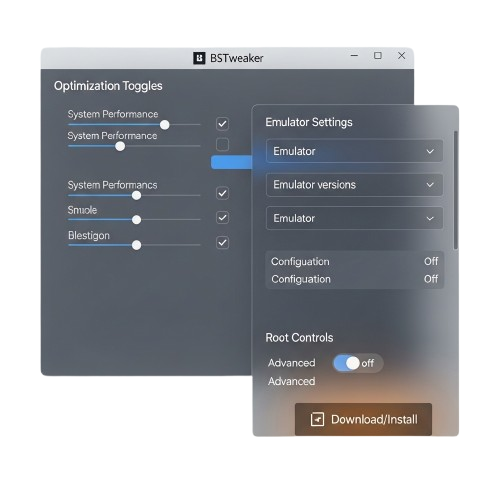
BSTweaker is a lightweight and efficient tweaker for BlueStacks and MSI App Player. It allows users to optimize performance, manage root access, and customize emulator settings easily.
Performance
Adjust CPU, memory, and device profiles to enhance BlueStacks and MSI Player performance for smooth gameplay and optimal efficiency.
Root Management
Enable or disable root access easily, allowing advanced Android features and safe system-level tweaks within your emulator environment.
Device Profiles
Modify screen resolution, DPI, and device type to simulate multiple Android devices for testing and optimization efficiently.
Easy Integration
Works directly with BlueStacks or MSI App Player without replacing installations, keeping your system stable and fully functional.
Lightweight
Runs quietly in the background using minimal resources, allowing real-time tweaks without slowing down your emulator or Windows PC.
Advanced Settings
Access hidden options to fine-tune emulator behavior, improve performance, and customize features without affecting core installation.
Safe Tweaks
All modifications are applied locally, keeping your emulator secure, reversible, and fully safe while enabling full customization.
Community Support
Supported by an active user community, offering tips, updates, troubleshooting help, and advice for optimizing emulator performance.
Why Choose BSTweaker
BSTweaker is a fast, simple, and lightweight tool that lets you tweak and optimize BlueStacks and MSI App Player settings, manage root access, and improve emulator performance.
Performance Optimization
BSTweaker helps adjust CPU, memory, and device profiles for smoother gameplay, ensuring your emulator runs efficiently without slowing down your system.
Root Access Control
Enable or disable root access easily, safely giving developers and testers full control over advanced Android features without risking your emulator setup.
Device Simulation
Modify device profiles, DPI, and screen resolution to emulate different Android devices for testing apps or improving game performance.
Quick Tweaks
Easily apply tweaks with simple scripts and built-in options, quickly letting you optimize settings and overall performance without navigating complex menus.
Lightweight & Efficient
BSTweaker runs quietly on your Windows PC with minimal system resources, allowing real-time modifications without affecting gameplay or emulator stability.
Transparent & Safe
All tweaks are applied locally, fully reversible, completely secure, keeping your BlueStacks or MSI installation safe while giving full customization options.
Download BSTweaker
BSTweaker is a free, lightweight tool for Windows that lets you tweak and optimize BlueStacks and MSI App Player settings. Download it from trusted official platforms to customize your emulator safely.
System Requirements
Operating System: Windows 10 / 11 (64-bit recommended)
Supported Emulators: BlueStacks & MSI App Player
Price: Free
License: Open Source
Installation Guide
Download BSTweaker
Get the latest BSTweaker from the official site or trusted repository for safe, up-to-date emulator tweaks.
Install the Tweaker
Open the downloaded file and follow instructions to integrate BSTweaker safely with your installed emulator.
Launch BSTweaker
Start BSTweaker from its folder. It will detect your emulator and load all tweak options automatically.
Apply Tweaks
Adjust CPU, memory, device profiles, or enable root access safely without affecting your emulator installation.
What Users Say About BSTweaker
BSTweaker Frequently Asked Questions
Learn everything about BSTweaker, the lightweight tool for BlueStacks and MSI App Player. These FAQs cover installation, tweaks, root access, performance, and troubleshooting tips.
Download the latest version from the official BSTweaker website or trusted repository.
Yes, BSTweaker is completely free to use.
BSTweaker supports Windows 10 and Windows 11 (64-bit recommended).
Yes, BSTweaker requires BlueStacks or MSI App Player installed.
Yes, BSTweaker fully supports both BlueStacks and MSI App Player.
Yes, BSTweaker lets you modify CPU allocation for smoother performance.
Yes, you can tweak RAM settings for your emulator using BSTweaker.
Yes, you can enable or disable root access safely.
Yes, BSTweaker allows modifying screen resolution, DPI, and device type.
Yes, hidden settings and advanced options are accessible safely.
Yes, BSTweaker runs quietly with minimal system resource usage.
Yes, it tweaks CPU, memory, and device settings to make BlueStacks or MSI App Player run smoother.
Yes, all changes are local, fully reversible, and do not alter your original emulator files.
Yes, by optimizing resources and applying safe tweaks, it reduces lag and prevents common crashes.
Yes, it works with different BlueStacks and MSI App Player versions for full compatibility.
No, BSTweaker is lightweight and runs safely alongside Windows programs without causing conflicts.
No, it works offline after downloading; internet is only required to get updates.
Make sure BlueStacks or MSI is installed and running. Restart BSTweaker if needed.
Check emulator permissions and restart BlueStacks or MSI after applying changes.
Yes, all modifications are fully reversible at any time.
Yes, root can be enabled or disabled anytime without affecting emulator stability.
Join the BSTweaker community or forums for tips, troubleshooting, and updates.
Yes, it’s simple enough for beginners, yet powerful for advanced users to tweak performance.
BSTweaker – Optimize Your BlueStacks Experience Instantly

Boost BlueStacks performance with BSTweaker. Optimize settings, enhance speed, and customize your Android emulator for a smoother experience.
Price: Free
Price Currency: $
Operating System: Windows
Application Category: Software
4.7